
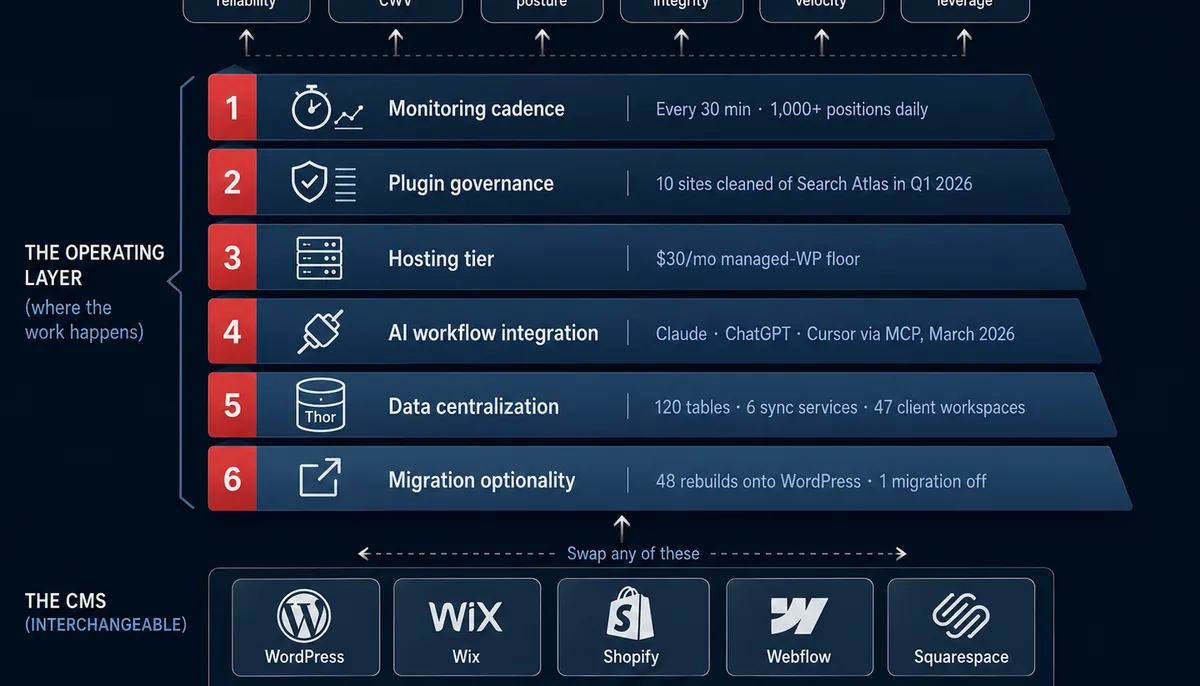
Part 1 argued that the CMS doesn't predict website success in 2026. Part 2 is the prescriptive half. Six operating-layer practices, the cadence each one runs at, and what good looks like, backed by what we actually run across 79 WordPress sites, custom Go applications, and hosted-builder properties through our Thor reporting database. Apply these to any platform. Apply them this quarter. The operating layer is what compounds.
Part 1 of this series argued that the CMS you pick predicts almost nothing about whether your website wins, and that the operating layer above the CMS predicts almost everything. This is Part 2: what's actually in that operating layer, and how to know whether your current agency is running it for you.
Before naming the six practices, one ground rule: each one has a frequency. Operating-layer work is defined by cadence. If you can't put a frequency next to a practice, you don't operate it; you maintain it occasionally. Those are different jobs with different outcomes.
The six practices below are the ones we currently run across every client engagement. They are the same regardless of whether the site is WordPress, Shopify, custom Go, or a hosted builder.
Practice #1: Monitoring cadence beats reporting cadence
The single biggest predictor of website success in 2026 is how fast something gets caught. Reporting tells you what already happened. Monitoring tells you what's happening, while you can still fix it.
A monthly report can show that conversions dropped 30% in February. By the time the report is read, March is half over. A monitoring system shows that conversions dropped 30% three hours after the change deployed, and the same person who broke it can roll it back the same afternoon.
What good operating cadence looks like:
| Surface | Bad cadence | Good cadence |
|---|---|---|
| Conversion events firing | Quarterly QA | Continuous automated check |
| Ad budget pacing | Monthly review | Every 30 minutes |
| Keyword positions | Monthly snapshot | Daily tracking (1,000+ across portfolio) |
| Site uptime | "We'll know when it's down" | Sub-minute alerting |
| Page speed regressions | Annual audit | Weekly site audit |
| Plugin and theme updates | Manual whenever | Continuous |
| Visual regressions | Eyeballed at delivery | Automated diff per deploy |
How to test your setup this week: Email your agency and ask, "If our conversion tracking broke at 11 AM on a Tuesday, when would you know?" The answer should be measured in minutes or hours. If it's measured in days or "the next reporting cycle," you don't have monitoring, you have reporting.
We've written about the monitor-vs-report distinction at length in 7 Red Flags When Hiring an Edmonton Digital Marketing Agency, Conversion Tracking Breaks Silently, and What Breaks at 2 AM.
Practice #2: Plugin and extension governance
Most WordPress sites grow plugins the way garages grow boxes. Something showed up once, nobody wanted to throw it out, and now it lives there. This is a financial and security problem.
The Patchstack 2026 report logged 11,334 new ecosystem vulnerabilities in 2025, 80% of them in plugins. The exploitation window is five hours median. Every active plugin is a vendor relationship you're maintaining, an attack surface you're carrying, and an update conflict timer running in the background.
We treat the plugin list as a liability sheet that gets reviewed quarterly. In Q1 2026 we removed the Search Atlas (metasync) plugin from 10 client sites because the value-to-risk ratio had shifted. That's normal cadence for us. We add plugins when there's no better way to deliver the function, and we remove them the moment a better way appears.
What good plugin governance looks like:
- Quarterly plugin liability review with explicit add / keep / remove decisions
- Every active plugin has a documented business reason in one sentence
- Update cadence under 7 days for routine patches, under 24 hours for critical security patches
- No plugin in the install list is on its developer's "abandoned" status
- A standing answer to "what would we replace this plugin with if it disappeared?"
How to test your setup this week: Ask your agency for a current plugin list with a one-sentence justification per plugin. If they can't produce one in 48 hours, the plugins aren't being governed.
Practice #3: Hosting tier discipline
The 2026 floor for "I want my website to compete on speed and reliability" is approximately $30/month in managed hosting. Below that floor, you're competing with hands tied.
We run 79 WordPress sites on a managed Plesk environment. Not one of them is on bargain shared hosting. The reason is the math from Part 1: Wix sits at 71-75% mobile Core Web Vitals pass and Shopify at ~65% because they own the hosting layer end-to-end. The median WordPress site sits at ~44% because the median WordPress install is on cheap hosting with no caching strategy. Move WordPress onto a managed host with edge caching, and the gap reverses on real sites.
What good hosting discipline looks like:
| Surface | Bad | Good |
|---|---|---|
| Hosting plan | Shared $5/mo | Managed WP or hosted-builder platform |
| Full-page cache | None or plugin-only | Edge CDN with cache rules |
| Backups | "The host backs up nightly" | Daily, with a documented restore time |
| Staging | None | Mirrors production, on-demand reset |
| Web Application Firewall | None | Platform-level WAF + DDoS protection |
| PHP / runtime version | Whatever it was at launch | Current stable, tracked |
How to test your setup this week: Ask your agency for the hosting plan name, monthly cost, and what's included. If "we don't manage the hosting" is the answer, you're paying for marketing on infrastructure that nobody owns.
Practice #4: AI workflow integration
In 2026, AI is becoming the operating layer for content production, customer support, and increasingly for content publishing itself. Two platforms opened protocol-level access to AI agents in 2026: WordPress.com with MCP write access in March, and Shopify with Sidekick + Agentic Storefronts in Winter. They have a structural advantage that closed-AI platforms can't match without changing posture.
This isn't about putting an AI writer in the editor. Wix and Squarespace have those. This is about whether your site can participate in an AI workflow that lives outside your CMS: agents that draft content from your CRM, syndicate product data to Perplexity, or run optimization experiments off your analytics.
What good AI workflow integration looks like:
- The CMS or platform exposes a REST API or MCP server with write access under your control
- Structured content schema (not blocks of HTML) so AI can read and write reliably
- An automation layer (n8n, Make, custom) that mediates between AI agents and the site
- Editorial workflow that distinguishes AI-assisted drafts from approved publication
- Logging that records which agent did what, so reviews and rollbacks are possible
How to test your setup this week: Ask whether your current site has a public API you control with write access. If the answer is "you can export to CSV," you're on a platform that will gate AI access.
We track AI visibility itself as a separate monitoring surface; see How We Monitor 60,000+ Data Points Across Our Client Base and Tracking AI Platform Visibility for the monitoring side.
Practice #5: Data centralization
The single highest-leverage piece of infrastructure we've built is Thor: a PostgreSQL database with ~120 structured tables that consolidates every source of truth for every client into one read-only canonical store. GA4, Google Search Console, Google Ads, SEMrush, DataForSEO, Meta, Google Business Profile, call tracking, CRM, and Jira all flow into Thor through dedicated sync services. Reports, weekly briefs, and the live dashboard at reporting.choice.zone all read from Thor. Source APIs are never queried directly for reporting.
The reason is operational integrity. If your monthly report says 12,000 sessions and your dashboard says 11,400 and the source API says 12,300, you can't tell a client which is right. We solved that by making Thor the only place reports get their numbers from. The number is the number.
For a small business, the principle applies one level down: you should have one place where your performance numbers live, and every dashboard, report, and slide that references them should read from that one place. The most common reason agency numbers don't match Google's numbers is that everyone is reading from a different source on a different day with a different lookback window, an operating defect rather than a data error.
How to test your setup this week: Pick a metric, for example "leads from organic search in April." Ask your agency to walk you through the path from raw GA4 data to the number that appears in your report. If the answer is hand-wavy, the number isn't reproducible.
Deeper read: Why We Built a Single Source of Truth for Client Data and How We Monitor 60,000+ Data Points Across Our Client Base.
Practice #6: Migration optionality
The last operating practice is the most strategic: keep the cost of leaving low. Every platform-level decision either reduces your migration optionality or preserves it.
This is why we lean on WordPress's REST API and Shopify's API rather than locking content into a proprietary page builder that can't be exported. It's also why our default rebuild stack is WordPress with Elementor (48 small-business websites rebuilt onto it to date), while still moving sites off WordPress when the business case requires it. We migrated wojciksfuneralchapel.com off WordPress and Elementor onto a custom Go application when the performance and reliability requirements pushed past what the builder could deliver, and we didn't lose the content because the content lived in queryable database tables, not in builder-specific shortcodes.
What good migration optionality looks like:
- Content stored in structured, exportable formats: database tables, Markdown, structured JSON. Not in builder-only artifacts.
- Public APIs with read AND write access
- Theme and template code in version control, not just on the production environment
- Documented backup and restore procedures that have actually been tested in the last 90 days
- A standing answer to: "What would it cost to move off this platform in 90 days?"
How to test your setup this week: Ask your agency, "If we decided to move to a different platform next year, what would block us, and what would the rough cost be?" If the answer is "you'd basically start over," your migration optionality is zero, and your vendor knows it.
The operating stack at a glance
| # | Practice | Frequency | Primary signal | Failure mode if missing |
|---|---|---|---|---|
| 1 | Monitoring cadence | Continuous, sub-daily | Time-to-detection on any regression | Issues caught at end-of-month report |
| 2 | Plugin governance | Quarterly review + per-disclosure | Active plugin count and CVE exposure | Vulnerable, slow, conflict-prone site |
| 3 | Hosting tier | Continuous baseline | Core Web Vitals + uptime | Speed and reliability ceiling capped |
| 4 | AI workflow integration | Continuous, pipeline-driven | Agent-accessible API surface | AI roadmap stalls at editor features |
| 5 | Data centralization | Real-time + nightly canonicalization | Reproducibility of any report number | Reports that don't match Google |
| 6 | Migration optionality | Audited per engagement | 90-day cost-to-move estimate | Vendor lock-in priced into every renewal |
The 90-day self-audit
If you read both parts of this series and want a single action to take this quarter, run the six tests. Email them to your current agency tomorrow.
| # | Question to ask | What a passing answer looks like |
|---|---|---|
| 1 | "If conversion tracking broke at 11 AM Tuesday, when would you know?" | Minutes or hours, not days |
| 2 | "What's our current plugin list and the business reason for each?" | Documented within 48 hours |
| 3 | "What hosting tier are we on and what's included?" | Managed, with caching, WAF, backups, staging |
| 4 | "Does our site expose a public API with write access under our control?" | Yes, with documented endpoints |
| 5 | "Walk me through how a number in our monthly report gets calculated." | Reproducible end-to-end from source data |
| 6 | "What would it cost to migrate off this platform in 90 days?" | A real number, neither zero nor catastrophic |
Six questions. The pattern of answers will tell you more about your operating layer than any agency case study ever will.
Quick answers
What is the "operating layer" of a website?
The set of operational practices that sit above the CMS and predict whether a website performs as a business asset. Six practices in our framework: monitoring cadence, plugin governance, hosting tier, AI workflow integration, data centralization, and migration optionality. Each one has a frequency. Each one is platform-independent.
How often should a small-business website be monitored in 2026?
Reportable surfaces (keyword positions, conversion events, page speed, ad-budget pacing) should be tracked at sub-daily frequency. We run budget pacing every 30 minutes, position tracking daily across 1,000+ keywords, conversion-event QA continuously, and site uptime sub-minute. Monthly reports are an output, not a cadence.
What does good plugin governance look like on WordPress?
A documented one-sentence business reason per active plugin, a quarterly add/keep/remove review, a patch cadence under 7 days for routine updates and under 24 hours for critical security patches, zero plugins marked abandoned by their developer, and a standing answer to "what would we replace this with if it disappeared tomorrow."
What is migration optionality and why does it matter?
Migration optionality is the cost of moving off a platform, expressed as a real number and a 90-day plan. High optionality means content stored in structured exportable formats (database tables, Markdown, JSON), public APIs with read AND write access, theme and template code in version control, and tested backup/restore. Low optionality is vendor lock-in priced into every renewal you don't realize you're paying.
How is AI changing small-business websites in 2026?
Two big shifts. First, AI agents can now read and write to your CMS directly: WordPress.com opened MCP write access in March 2026 and Shopify rolled out Sidekick + Agentic Storefronts. Second, AI search surfaces (ChatGPT Search, Perplexity, Google AI Overviews) are now meaningful traffic sources, and they cite well-structured content with explicit claims and sources. Platforms with closed AI features (Wix, Squarespace) shorten your AI roadmap to whatever fits inside their editor.
What's the difference between monitoring a website and reporting on a website?
Monitoring is continuous and signal-shaped: an automated system catches a regression while you can still fix it, usually within minutes or hours. Reporting is periodic and rear-view: a monthly PDF tells you what already happened. Most agencies sell reporting and call it monitoring. The test is simple: ask how fast a broken conversion pixel would be caught. Minutes-to-hours means monitoring. Days-to-weeks means reporting.
Why this comes from Choice OMG
Most agencies are CMS shops. They have a stack they sell. WordPress shop. Webflow agency. Shopify partner. The CMS choice is the centerpiece of the pitch because it's also the centerpiece of the operating model. If the CMS isn't the value, the agency doesn't have much to sell.
We're built differently by deliberate design. We're an Edmonton-based digital marketing agency with clients across Western Canada. We run 79 WordPress sites alongside custom Go applications, hosted builders, and Shopify stores because the platform isn't where we add value. The value sits in the six practices above: Thor as the single source of truth, every-30-minute budget pacing, daily position tracking across 1,000+ keywords, quarterly plugin liability reviews, managed hosting baselines, and migration optionality preserved on every engagement.
That's the layer that compounds. That's the layer that survives platform changes. And that's the layer almost nobody is selling, because it's harder to demo on a sales call than a CMS template.
If you want a conversation about your operating layer rather than your CMS, get in touch and bring the answers to the six self-audit questions above; that's where we'll start.
Related reading
- Part 1: The Platform Debate Is a Distraction: 7 Myths About Choosing a Website CMS in 2026
- 7 Red Flags When Hiring an Edmonton Digital Marketing Agency
- Conversion Tracking Breaks Silently
- What Breaks at 2 AM: Why Marketing Needs Automated Infrastructure
- Why We Built a Single Source of Truth for Client Data
- How We Monitor 60,000+ Data Points Across Our Client Base
- Why We Don't Charge a Percentage of Ad Spend
- The Real Cost of SEO in 2026