
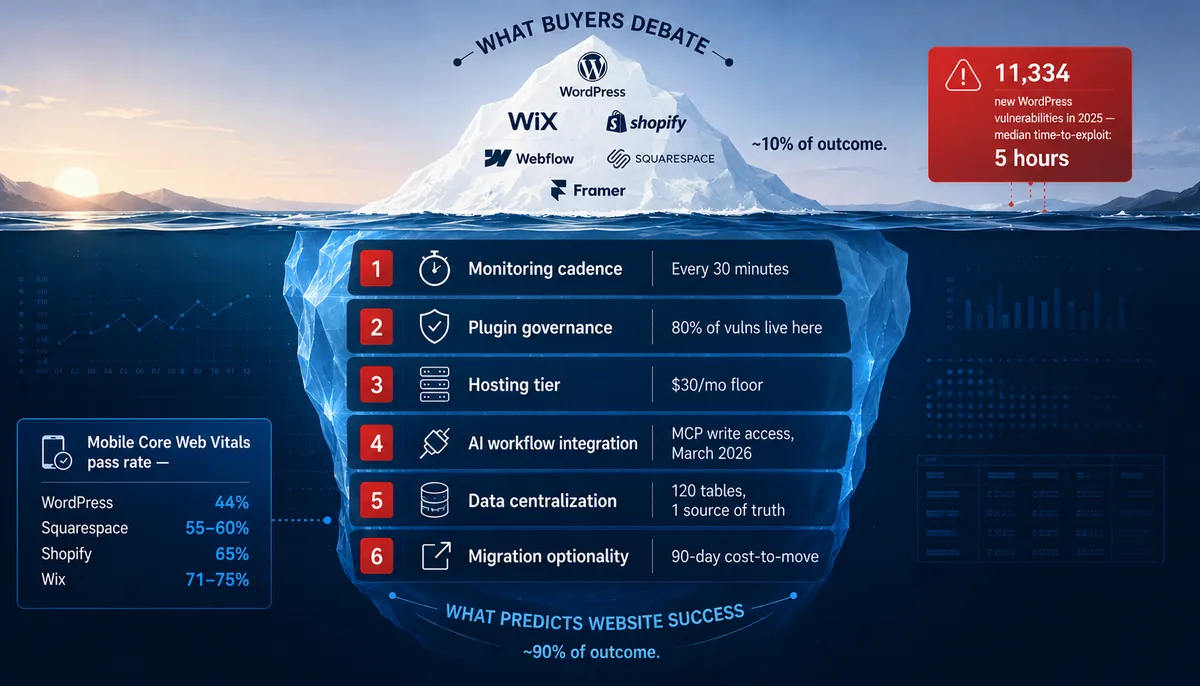
In 2026, the CMS you pick predicts almost nothing about whether your website wins. The operating layer above it predicts almost everything. We run 79 WordPress sites, 47 client reporting workspaces, custom Go applications, and hosted-builder sites in parallel. The platform is not what separates the businesses that get results from the businesses that don't. Below are seven myths every agency is still selling, and what the 2026 data actually shows.
Every "how to choose a CMS" article frames this as a feature comparison. WordPress has more plugins. Wix has better AI. Shopify has stronger commerce. Webflow has cleaner design. Squarespace is easier. Pick whichever set of trade-offs matches your priorities.
That framing has been wrong for at least three years, and the gap between framing and reality widened sharply in 2026. The platform decision is not the strategic decision. It hasn't been since the difference between "managed WordPress on a $30/mo host" and "Wix on its default stack" narrowed to something most owners can't perceive with the naked eye.
We say this from operational experience, not editorial opinion. We're an Edmonton-based digital marketing agency with a portfolio spread across Western Canada in healthcare, skilled trades, and professional services. We currently manage 79 WordPress sites on a single managed Plesk environment, sync data for 47 active client reporting workspaces through a 120-table single source of truth, and have migrated sites both into and out of WordPress when the business case required it. Across all of that work, the predictor of success isn't which platform sits underneath. It's what we operate above it.
Here are the seven myths that keep small businesses choosing for the wrong reasons.
Myth #1: "WordPress is the safest choice because it's the most widely used"
Reality: WordPress is the most-attacked stack on the internet because it's the most widely used. The 2026 Patchstack security report logged 11,334 new vulnerabilities in the WordPress ecosystem in 2025, a 42% jump from the year before. The median time from public disclosure to first exploitation is five hours.
That number doesn't mean WordPress is unsafe. It means unmanaged WordPress is dangerous in a way it wasn't five years ago. The exploitation window has collapsed: 20% of heavily-exploited vulnerabilities are weaponized within six hours of public disclosure, 45% within 24 hours, and 70% within a week. "We update plugins monthly" is now an operational gap measured in hundreds of attack-hours.
| Patchstack metric | 2024 | 2025 |
|---|---|---|
| New ecosystem vulnerabilities | 7,966 | 11,334 |
| Year-over-year change | n/a | +42% |
| Highly exploitable share | baseline | +113% |
| Median time-to-exploit (heavily-targeted) | n/a | 5 hours |
WordPress is still the safest choice when it's governed properly, and the most dangerous choice when it isn't; governance is what makes the difference, not the platform.
What this means for you: If your current agency can't tell you in writing how fast plugin updates are applied across your site and what their monitoring cadence looks like, the size of WordPress's market share is not protecting you.
Myth #2: "Hosted builders like Wix and Squarespace are slow"
Reality: They're meaningfully faster than the median WordPress site in 2026.
According to public Core Web Vitals data from HTTP Archive's Tech Report, only about 44% of WordPress sites pass all three Core Web Vitals on mobile. Compare:
| Platform | Mobile CWV pass rate (2026) |
|---|---|
| Wix | 71-75% |
| Shopify | ~65% |
| Squarespace | 55-60% |
| WordPress | ~44% |
Wix and Shopify win on the average because they control the hosting layer: one stack everywhere, for both. WordPress is whatever host you bought, whatever theme you picked, whatever plugins you installed, and whatever cache, if any, got configured, and that variance across installs is what drags the average down.
WordPress on a well-tuned managed host with a lean theme and proper caching beats almost everything. WordPress on $5/month shared hosting with a heavy page builder and 47 active plugins is what the average looks like, and the average is slow.
The practical takeaway: "Switching to a hosted builder will make my site faster" is true on the median, and untrue on the upper quartile. If you want to stay on WordPress and beat the hosted builders, you need to operate it like infrastructure, not like a hobby.
Myth #3: "WordPress is the AI laggard"
Reality: WordPress is taking the AI route that scales best for serious businesses, and Wix and Squarespace are taking the route that locks you in.
In March 2026, WordPress.com opened write access to its Model Context Protocol (MCP) server. AI agents (Claude, ChatGPT, Cursor) can now connect directly and create posts, build pages, manage comments, and organize content on any WordPress.com site with a paid plan. WordPress is also shipping the MCP Adapter and Abilities API for self-hosted sites.
Shopify is doing the same on its side: Sidekick plus Agentic Storefronts, syndicating products directly into ChatGPT, Microsoft Copilot, and Perplexity. Two of the three biggest CMS platforms have publicly committed to open AI integration protocols in 2026.
Wix and Squarespace have AI generation features inside the editor. They're useful for the owner sitting in the editor. They're not useful when you want to wire your site into a marketing automation stack, a content production pipeline, or an AI agent workflow that touches multiple systems. Those features stop at the platform's walls.
For your roadmap: if it includes AI inside your operating workflow, not just AI inside your editor, the open-protocol platforms (WordPress and Shopify) have a structural advantage that the closed-platform AI tools can't match.
Myth #4: "If my site is slow, switching platforms will fix it"
Reality: Hosting tier and plugin discipline dwarf platform choice. Switching platforms without fixing the operating layer just moves the problem to a different vendor's pricing page.
We've taken WordPress sites from "poor" to "excellent" Core Web Vitals without leaving WordPress. We've also seen sites move from WordPress to a hosted builder and gain nothing measurable because the page weight, the third-party scripts, the image discipline, and the absence of caching strategy all moved with them.
The deep research behind this series put it bluntly: performance headroom on WordPress depends on host quality, cache strategy, image optimisation, and script discipline. Same as performance on every other platform. The difference between platforms in 2026 is the floor, not the ceiling.
Before you migrate: fix the four things that actually move page speed: tier of hosting, count of active plugins, image format and size discipline, and whether you have full-page caching. If the answer to those four questions is "I don't know," the platform isn't your problem.
Myth #5: "Cheap hosting is fine for small businesses"
Reality: The $5/month shared-hosting WordPress era is over. Anyone still pitching it in 2026 is selling you 2018.
Of the 79 WordPress sites we currently manage, none run on bargain shared hosting. They run on a managed Plesk environment with PHP, MySQL, and security baselines we control, and the decision comes down to cost math.
A shared host at $5/month gives you contended CPU, throttled I/O, no edge cache, no CDN, and shared IP reputation. A managed WordPress host at ~$30/month gives you dedicated resources, edge caching, CDN, WAF, automated backups, staging environments, and a support team that knows WordPress. The difference shows up in everything from page speed to security to recovery time when something goes wrong.
If you can't justify $30/month for hosting, you probably can't justify a custom website either. Use a hosted builder. That's not an insult; it's a coherent operating decision. What doesn't work is cheap WordPress hosting plus the expectation of business-grade reliability.
Ask your agency this: what they're paying for hosting on your behalf and what's included in that tier. If the answer is "we don't manage hosting" or "we use whatever you have," that's not a service. That's an abdication.
Myth #6: "Plugins are productivity, not risk"
Reality: Plugin count is one of the highest-correlation risk metrics in WordPress. The Patchstack 2026 data is unambiguous: 80% of WordPress-ecosystem vulnerabilities live in plugins, and 46% are not patched in time for disclosure.
We treat the plugin list as a liability sheet, not a feature list. In Q1 2026 we removed the Search Atlas (metasync) plugin from 10 client sites because the risk and ongoing maintenance cost didn't justify the value. That's a normal cycle for us. We add plugins when there's no better way to deliver the function, and we remove plugins the moment a better way appears.
A 30-plugin WordPress install carries a long fuse on an attack surface, plus performance overhead, plus an update conflict timer running 24/7. Every plugin is a vendor decision that someone has to keep monitoring.
Check this now: count the active plugins on your site. If the number is over 25 and your agency has never proposed removing any of them, the agency is treating your site like a feature box, not a system.
Myth #7: "Picking the right CMS is THE strategic decision"
Reality: The CMS is one of dozens of decisions, and not the most important one.
We run 79 WordPress sites and roughly a dozen non-WordPress properties: custom Go applications, hosted builders, Shopify stores. The pattern across all of them is the same: the businesses that succeed online are the ones where someone is operating the layer above the CMS. The businesses that struggle are the ones where the CMS choice was the last serious technical decision anyone made about the site.
What lives in that layer above the CMS:
| Visible: what buyers debate | Submerged: what actually predicts success |
|---|---|
| Which CMS | Monitoring cadence and alerting thresholds |
| Which theme | Plugin and extension governance |
| Which page builder | Hosting tier and cache strategy |
| Which template | AI workflow and content pipelines |
| Editor convenience | Data centralization and reporting integrity |
| Brand colours | Migration optionality and vendor lock-in posture |
The first column is what every agency pitches. The second column is what determines whether your website is an asset or a liability eighteen months from now.
Before you sign off on a migration: ask whoever's selling it what's in their second column. If they don't have one, the CMS migration is not going to save you.
The iceberg, in one line
The CMS is roughly 10% of the outcome. The operating layer above it is roughly 90%. The proportions are illustrative. The directional truth is not. After fifteen years and several hundred small-business site engagements, the layer above the CMS dominates the outcome, and it's the layer almost nobody is selling.
How to use this article this week
If you read this and want a single action to take, do this: pick the three myths above that best describe an argument you've heard from a previous agency. Write them down. Then ask your current agency, in writing, how they handle the reality version of each one. The shape of their answers will tell you whether they operate websites or just build them.
If you want a deeper read on adjacent failure modes, 7 Red Flags When Hiring an Edmonton Digital Marketing Agency catalogues the operating-layer failures that show up first when nobody is watching. Conversion Tracking Breaks Silently shows the most common one in detail.
Quick answers
Does the CMS choice matter for SEO in 2026?
Marginally. Core Web Vitals, structured data, page architecture, internal linking, and crawl health matter. The CMS becomes relevant only when it makes those harder or easier to operate. WordPress, Shopify, and Webflow can all rank top-3 in the same niche; the differentiator is the operating layer above the CMS, not the platform underneath.
Is WordPress secure in 2026?
Yes, when governed. The Patchstack 2026 report logged 11,334 ecosystem vulnerabilities with a five-hour median time-to-exploit, and 80% of them live in plugins. WordPress on a managed host with quarterly plugin liability reviews and an under-7-day patch cadence is one of the safest options on the market. WordPress with 35 unmonitored plugins on shared hosting is one of the most dangerous.
WordPress vs Wix for small business: which is faster?
On the median, Wix is faster (71-75% of sites pass mobile Core Web Vitals versus ~44% for WordPress). On the upper quartile, well-tuned WordPress on managed hosting with a lean theme and proper caching beats either. The platform sets the floor; the operating layer sets the ceiling.
Will switching from WordPress to a hosted builder fix my slow site?
Usually not. We've moved sites in both directions. The gains come from fixing host quality, plugin discipline, image strategy, and caching, not from the platform swap itself. Migrate when the operating model can't deliver on the current platform, not because the marketing on the new platform sounds better.
Which CMS is best for AI integration in 2026?
WordPress.com and Shopify both shipped protocol-level AI access in 2026: WordPress.com opened MCP write access in March, and Shopify rolled out Sidekick plus Agentic Storefronts. Both let external AI agents read and write to your site under scoped permissions. Wix and Squarespace ship AI features inside the editor only, which is useful if you write inside the editor and a structural limitation if your AI workflow lives outside it.
Why this comes from Choice OMG
We're CMS-agnostic by deliberate design. Most agencies are WordPress shops, Webflow shops, Shopify partners, or hosted-builder resellers. Their pitch starts with their stack because their economics depend on you choosing it.
Ours doesn't. We run 79 WordPress sites because most of our small-business clients fit WordPress, alongside custom Go applications, hosted builders, and Shopify stores because some don't. The value sits in the operating layer above whichever CMS we land on: a 120-table single source of truth in our Thor reporting database, every-30-minute budget pacing across managed Google Ads accounts, daily position tracking across 1,000+ keywords, quarterly plugin liability reviews, managed hosting baselines, and migration optionality preserved on every engagement.
That's what Part 2 is about.
Coming in Part 2
The prescriptive half. Six operating-layer practices that move the needle on any platform, the cadence and signals that define each one, and a six-question self-audit you can email to your current agency this week to test whether your site is being operated or just maintained.
Read it here: The Operating Layer: 6 Practices That Predict Website Success in 2026 (Regardless of CMS).