
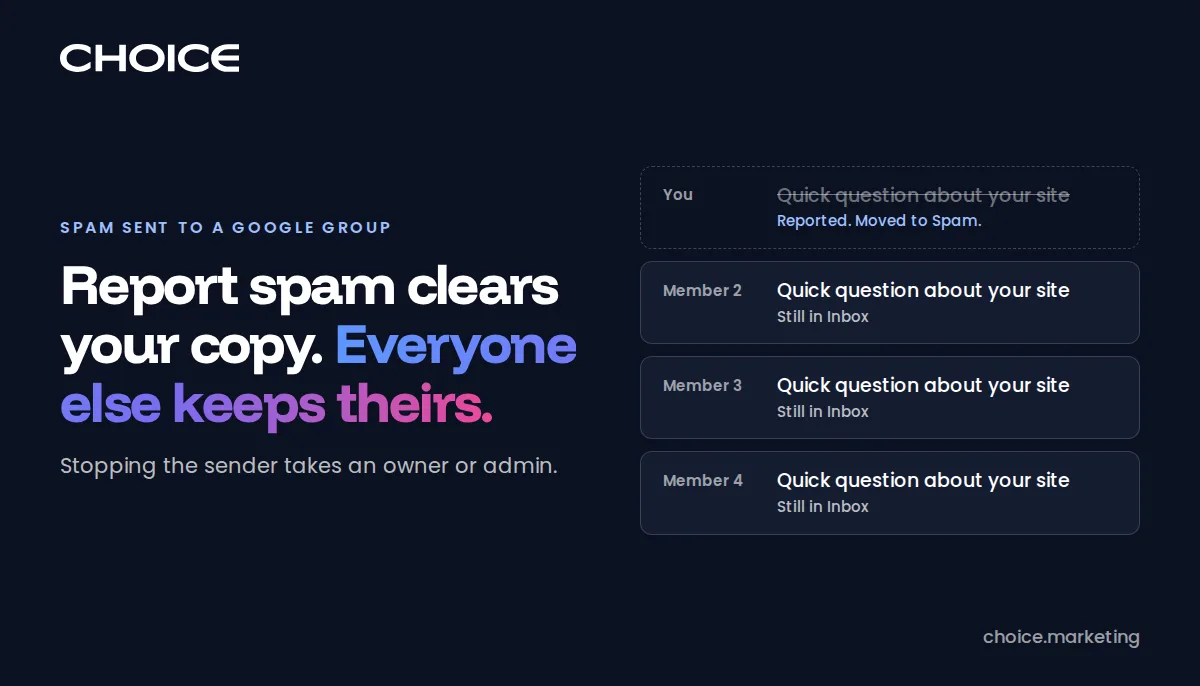
Report spam clears your copy and tells Google; everyone else keeps theirs. To stop a sender for the whole group, an owner can ban the address and an admin can reject it. We built our own mail server in front of Google for a narrower need. Our spec is at the end: paste it into any coding agent, free to use with credit.
Which button to press
No button in Gmail stops a sender for a whole group.
- Junk came through info@ or sales@: Report spam in Gmail, after the sender check. Your copy moves to Spam and Google gets a copy.
- You can see the conversation in Google Groups: Report abuse. It's hidden from you alone, and Google gets a copy.
- Report spam, Block or a filter didn't stop it: send the address to your group owner or admin. All three act on one mailbox, after Google accepts the message.
- You own or manage the group: ban the address. Google says a banned sender can't post.
- You're a Workspace admin: write a reject rule. The mail is rejected before it reaches the group.
- A group you never joined: leave it, uncheck Add me to their groups and report it. Reporting alone doesn't unsubscribe you.
Check the sender line first
Nineteen of the 50 most recent threads on our shared inbox, a Google Group with four member mailboxes, showed the sender as mailbox@choice.marketing itself when we checked on October 8, 2026. Google documents the rewrite: mail from a domain with a p=quarantine or p=reject DMARC policy arrives as "'Sender Name' via Group-Name", carrying the group's address.
After a report, Google says, mail "from the same sender might be sent to the Spam folder," and on those threads the sender shown is your group. By that description the report counts against your own group, and that is what we saw on ours: reporting or blocking mail that came through mailbox@choice.marketing reported or blocked the group's own address.
If you see "via" and your group's name, use neither. Report it in Groups instead and pass on the real address, which Gmail's Show original lists under X-Original-From.
Group owners can ban a sender
A group owner or manager can ban a non-member by typing the address, with no admin rights. Google's page puts it under People, Banned users, requires the Who can manage members permission, and says a banned person "can't post to the group." It doesn't say what the sender sees or how a ban treats an address with no Google account, and we haven't tested it.
Moderation suits junk from many addresses: set Moderate messages from non-members, then work the Pending queue, where Reject author bans the sender and reports the messages as spam. Google deletes unapproved messages after 14 days, so a customer's first email to sales@ can expire unread. Limiting Who can post to members shuts outsiders out, which suits a staff list and breaks info@.
Admins can reject a named sender
A Workspace admin can refuse one sender's mail to one group with a Content compliance rule, and Google documents a 550 5.7.1 rejection code for it. We've never run this rule, and we built our gate without evaluating it, so try it first.
Blocked senders looks like the answer, but Google warns that blocked mail "might still reach users in Google Groups." A community thread reports a similar failure and suggests this rule.
In the Admin console, under Apps, Google Workspace, Gmail, Compliance, Content compliance takes these settings:
- Check Inbound messages.
- Under If ANY of the following match the message, add two Advanced content match expressions, Sender header and Envelope sender, each Equals the address.
- Choose Reject message, with an optional notice to the sender.
- Under Show options, Account types to affect, check Groups. Users is the default; Google says Groups fires "when your groups receive email."
- Under Envelope filter, check Only affect specific envelope recipients and enter the group's address as a Single email address. Avoid Group membership, which Google says "affects group members."
Step 2 checks both fields because four of the 10 refusals at our own gate matched only the visible From line, each with a different envelope address. Google doesn't spell out this combination or say whether the rejection happens during the SMTP session, so test on a spare group, then read Matched rules in Email Log Search. Include an address with a dot or plus sign, which Google says content filtering strips from usernames.
No API can script either list: Google's Policy API table marks Blocked senders and Content compliance "No" under Mutate supported, and its June 2026 write endpoints cover data loss prevention only. Delivered copies stay until someone deletes them, which the security investigation tool can do on editions that include it.
Where else to report
A report made through Groups goes to Google alone, never to your own abuse@ address. An admin can create that group from the console; staff forward suspicious mail to it, and Google monitors it. For a Gmail account breaking Google's policies, use the abuse form. For commercial email, Canadians can file with the Spam Reporting Centre, and people in the US at ReportFraud.ftc.gov, which can't accept forwarded emails.
We built a first hop for a narrower need
On October 9 a small ARM instance became our primary MX, the server the internet hands our mail to. It runs Postfix and a short Go filter, relays everything to Google, and leaves Google in DNS at a lower priority. The filter refuses mail for three reasons: the domain isn't ours, Google rejects the recipient, or a blocked sender is writing to the group. We left out spam scoring and DMARC enforcement because Google forgives some DMARC failures from forwarders and lists, and a stricter gate would bounce mail Google delivers.
We wanted any member to block in one click, with no admin rule to edit. That needs a list a program can write, so ours sits on the first hop, the server a sender is still connected to when it gets an answer. Members get a page of recent group mail with a Block button: it moves the sender's earlier mail to Trash in every member's mailbox, and their next message to the group gets a 550 during the session.
We proved the fallback on October 15 by stopping the gate on purpose: it was down 17 seconds, and a test message reached the Inbox through Google in 7.
The logs back a smaller claim than we planned
We meant to write that no legitimate mail was lost, and the logs won't let us. From the switch to November 1 the gate made 25,093 deliveries to Google. Google refused seven more after the gate had accepted them, and three were parts of a WordPress site's emailed backup: real mail that never arrived, though those backups had been reaching us incomplete for months before the gate existed. The gate lost nothing, and that is the claim we can make.
Manual blocks moved 176 copies to Trash across 42 senders with no errors, and the gate has issued 10 hard refusals since October 15. Ten is modest, and we can't measure the time it saves. One person has done all the manual blocking, restore has run only in acceptance testing, and these counts leave out the automated blocking we added later.
Who should build this
Most teams should stop at a ban or a Content compliance rule. We're Choice OMG, an Edmonton firm that runs digital marketing like infrastructure, so an MX suits us. You'd take on monitors and, when Google refuses mail your gate accepted, a bounce to send. Build one only if your shared inbox is a group and you want every member blocking in one click, earlier copies gone and refusals logged. For a single mailbox, Gmail's own Block is enough.
The spec
Coding agents wrote our code from a reviewed spec, and people held every DNS change, Google grant and credential. A real Gmail account caught what our tests missed: untrash doesn't put back the Inbox label, so four restored copies landed in All Mail, invisible. The spec carries that fix. Give your agent this line, or copy the whole block:
Read https://choice.marketing/downloads/first-hop-sender-blocklist-spec.txt and follow its instructions.
# Spec: first-hop sender blocklist for a Google Group

Source: Choice OMG, https://choice.marketing/blog/report-spam-google-group/
Copyright 2026 Choice Online Marketing Group, Inc. Licensed under CC BY 4.0: https://creativecommons.org/licenses/by/4.0/
Any use is allowed, commercial use and changes included. Credit Choice OMG and link to the source. Keep these lines in any copy.

## Instructions for the coding agent

1. Read this whole file before doing anything.
2. Ask the human for every value under INPUTS. Never guess one.
3. Run VERIFY FIRST on the human's tenant and report each answer. An answer can change the design.
4. Write a plan and get the human's approval before building.
5. Build in the order under BUILD ORDER. Write the tests under TESTS FIRST before the code they cover.
6. Stop at every step marked [HUMAN]: DNS changes, Google admin grants and credentials need a person. Never ask for a secret in chat and never print one.
7. You are done when every check under ACCEPTANCE passes on live mail with a real outside sender.

## Goal

Members of one Google Group block a sender with one click. That sender's next message to the group is refused with a 550 during the SMTP session, their earlier messages move to Trash in every member's mailbox, and Remove undoes both. Mail to every other address is untouched.

## Non-goals

Spam scoring, DMARC enforcement, quarantine, content scanning, greylisting, RBLs, abuse reports, and blocking for any address other than the protected group.

## Inputs

- DOMAIN: the Google Workspace domain whose MX will change.
- GROUP: the Google Group address to protect.
- TEST_DOMAIN and TEST_GROUP: a spare domain on the same tenant and a group on it, for stage 1.
- GATE_HOST: a small Linux VM with a static public IP and reverse DNS.
- SERVICE_HOST: an internal host for the page and the service.
- OWN_DOMAINS: domains that can never be blocked.
- NEVER_BLOCK: senders that can never be blocked, such as your accounting software and Google.

## Verify first

- Has the owner tried the native routes? A group owner can ban an address, and an admin can reject a sender with a Content compliance rule. The source post has the steps. Build this only if those fall short.
- Can GATE_HOST reach smtp.google.com on port 25 outbound? Many clouds block it by default.
- Does Google answer 250 at RCPT for an address that does not exist on DOMAIN? If it does, the recipient check will never refuse, and a monitor must probe a real address.
- What SIZE does Google's MX advertise? Set the gate's message limit to match. Postfix's default of 10 MB refuses mail Google accepts.
- Which other Groups exist on DOMAIN? After the switch each one delivers its member copies back through the gate.
- Which copies of group mail carry List-ID or a rewritten From, per member mailbox? Does Gmail's list: search return the same set as to:GROUP?

## Rules

- Fail open. Google's MX stays in DNS at a lower priority than the gate. If the filter fails, Postfix accepts the mail (milter_default_action = accept).
- The gate refuses for exactly three reasons: the recipient domain is not ours; Google refuses the recipient; the sender is blocklisted and the recipient is GROUP. Add no others.
- Never reject on DMARC at the gate. Google forgives some failures from forwarders and lists, and a strict gate would bounce mail Google delivers.
- Relay to Google over TLS with certificate verification. Never run an open relay. Change no headers beyond the trace header, so DKIM signatures survive.
- The gate holds no credentials for any other system and never calls home.
- Use one service account with domain-wide delegation and the gmail.modify scope only. Google applies that to every mailbox in the tenant, so route every Gmail call through one wrapper that refuses any mailbox not currently a member of GROUP. Name this trade to the owner and get a yes.
- Read group membership with the Groups Reader admin role on the service account.

## Components

1. Gate (GATE_HOST): Postfix as MX for DOMAIN, a fixed transport to [smtp.google.com]:25, cached recipient verification, and one small milter.
   - Match the envelope sender and every address in the From header against blocked addresses and domains. A blocked domain covers its subdomains.
   - Compare GROUP ignoring case and any +tag. Use Postfix's parsed address macros so a quoted address cannot hide a match.
   - Envelope match: refuse GROUP at RCPT. Other recipients are unaffected.
   - From header match with GROUP as the only recipient: refuse after the headers.
   - From header match with mixed recipients: remove GROUP from the message, deliver to the rest, and log it as dropped.
   - Refusal text: 550 5.7.1 Refused: this address has reported your mail as unsolicited bulk email. Remove it from your list.
   - The blocklist is a flat file replaced atomically. Check it every 5 seconds, keep the last good copy if a new one fails to parse, and say "within 5 seconds" in the page copy.
   - Log one JSON line per refusal and nothing about relayed mail. Delete logs after 14 days.
2. Sync: the service pushes the blocklist to the gate and pulls the refusal log, over SSH to a forced command that allows only those two operations.
3. Service (SERVICE_HOST): every 2 minutes, index group mail from each member's mailbox with Gmail's list: search. The true sender is X-Original-From when From is the group's own address. Store metadata only, in SQLite. Serve the page behind Google sign-in limited to current members of GROUP.
4. Page: recent mail with Block address and Block domain, a confirm step that lists what will move, the blocklist with Remove, refusals, and an activity log naming the member who acted. Block refuses OWN_DOMAINS, NEVER_BLOCK, whole freemail domains and shared sending services. A single address on those is allowed.
5. Purge: Block moves the sender's group mail from the last 90 days to Trash in every member's mailbox and records, per copy, whether it was in the Inbox. Remove restores each copy with one messages.modify call: remove TRASH, and add INBOX only if the copy was in the Inbox.
6. Monitoring: queue depth, bounce count, service health, and a live RCPT probe to a REAL address. Give health a startup grace: our first full index of about 4,800 messages took 12 minutes. Retiring the gate retires its monitors in the same change.

## Known Google behaviour (seen on a live tenant, October 2026; re-check yours)

- Trash removes the INBOX label and messages.untrash does not put it back. Untrashed mail lands in All Mail, invisible.
- Domain-wide delegation cannot be limited to a group's members.
- Most group copies carry no List-ID, and the From rewrite differs per member mailbox. Gmail's list: search still finds them.
- Other Groups on the domain send each member's copy back through the gate by MX lookup, with envelope sender group+bnc...@DOMAIN. Expect one session per member per message. They are not loops or duplicates, and the filter ignores them because the envelope recipient is the member. Size the VM for it.
- Behind an inbound gateway, Gmail writes no dmarc= clause and files p=reject failures in Spam.
- Google can refuse a message after the gate accepted it (552 5.7.0 on content). Postfix then sends the bounce to the envelope sender. Those bounces are the only mail the gate sends out, and some receivers refuse them.
- A new address can be refused for up to 10 minutes while the gate holds Google's old answer. After creating one, probe it until it answers 250.
- Postfix log lines with status=deliverable are address probes, not deliveries. Do not count them.

## Build order

1. Tests for the filter and the purge.
2. Gate, then sync, then service, then page.
3. Monitoring.
4. Rollout.

## Tests first

- The fake Gmail mirrors real side effects: trash removes INBOX, and untrash does not add it.
- A retried purge never turns a recorded was_inbox=true into false.
- A schema migration is safe on every start and when two processes race.
- Filter cases: envelope match, From header match, mixed recipients, +tags and case on GROUP, quoted addresses.
- A non-member is refused by the page and by the Gmail wrapper.

## Rollout

- [HUMAN] Admin console, Inbound gateway: add GATE_HOST's IP, turn on Automatically detect external IP and Require TLS. Leave the other options at their defaults.
- [HUMAN] Stage 0: lower the MX TTL to 300 at least 24 hours before the switch.
- [HUMAN] Stage 1: point TEST_DOMAIN's MX at the gate. Prove relay, refusal, purge and restore end to end with a real outside sender.
- [HUMAN] Stage 2: switch DOMAIN's MX, with the gate at priority 1 and Google at priority 10. Keep soft_bounce on, so a mistake costs a retry and not a lost message.
- Schedule checks at +1 h, +24 h and +48 h: queue, deferred, bounced, refusals, health, live RCPT probe. Nothing scheduled ours, and we missed two.
- [HUMAN] Stage 3: turn soft_bounce off, raise the TTL, and run the fail-open drill: stop the gate, send real mail, confirm it arrives through Google, start the gate.
- [HUMAN] Rollback: upsert the MX set to Google alone. Never delete the record set; it holds Google's record too. Stopping the VM is faster and also keeps mail flowing.

## Acceptance

- A blocked outside sender gets the 550 text on the next attempt, and the page shows the refusal.
- Block moves N copies to Trash and Remove restores N. Copies that were in the Inbox return there and archived copies stay archived. Confirm by reading a member's mailbox independently.
- A non-member gets 403 on the page.
- With the gate stopped, real mail still arrives through Google.
- Every refusal in the gate log traces to one of the three reasons.
The spec is licensed under CC BY 4.0: any use is allowed, commercial use included, as long as you credit Choice OMG and link to this post. The rest of this post stays under our site licence. If you build it and find something we missed, tell us.