
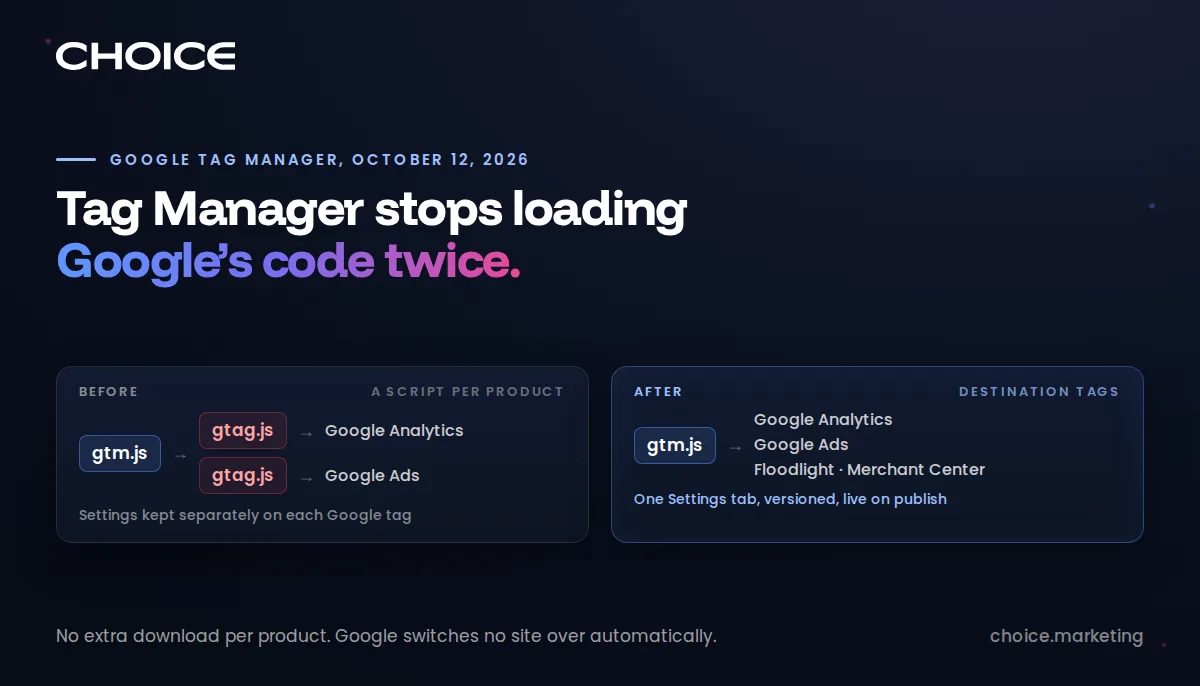
On October 12, 2026, Google changed how Tag Manager talks to its own products. A container can now send data to Google Analytics, Google Ads, Floodlight and Merchant Center directly, without downloading a second script for each one.
Privacy and consent settings move into one Settings tab, with version history, and change only when someone publishes. Google will not switch any site over automatically. We moved our first client four days after the release.
The upgrade is worth doing, with a review first, because the shared settings now apply to every Google tag at once.
Your site has been loading Google's code twice
Most business websites load Google Tag Manager, then use it to load a separate Google script, gtag.js, for Analytics and again for Ads. Google's own release note of October 12, 2026 says that extra JavaScript "could cause latency in measurement transmission", and that each Google tag it loaded "had its own settings and permissions, which sometimes made troubleshooting difficult."
The new arrangement links each Google account to the container as a destination. Each Analytics data stream, Google Ads account, Floodlight configuration and Merchant Center conversion source gets its own destination tag. When it fires, the instructions travel inside the Tag Manager file the page already downloaded. Analytics developer Simo Ahava called it "the biggest change in Google Tag Manager in over a decade" in his October 13 walkthrough, and named page performance as the reason to adopt it.
Google has not published how much smaller or faster a page gets, and the saving depends on how many Google products a site loads. We did not time our first migrated client's pages before and after, so we have no figure either. What we can show is the network log: after the switch, gtag.js no longer appears among the page's downloads.
Privacy settings now live in one place, with a history
Consent behaviour, user-provided data collection, cross-domain measurement and automatic event detection used to be configured separately on each Google tag. A business running Analytics and Ads could have two sets of rules that disagreed, and nobody would know until a report looked wrong.
Those settings now sit on a single Settings tab in the container. They are stored as container resources, so every change has a version, can be tested in preview, and goes live only when the container is published. An earlier version can be restored if a change misbehaves.
The rules also only tighten. A destination tag can be stricter than the container, never looser: if the container blocks user-provided data, a Google Ads tag cannot switch it back on. For a business answering to a privacy policy, that means one setting governs every Google product on the site, and the record shows who changed it and when.
Consent can hold data and release it later
A new option, Manage data transmission settings, tells Tag Manager to hold Google's measurement hits until a visitor grants consent, then send the held hits once they do. Building that queue by hand has been one of the harder parts of a consent setup. Preview mode now marks deferred hits and shows a Hits sent tab, so the behaviour can be checked before it goes live.
The control works only with Google's own tags. A Meta pixel, a LinkedIn Insight tag or a call-tracking script still needs its own consent handling.
Google will not do this for you, and that is deliberate
Every container shows an upgrade banner, and Google states that "no changes will be made automatically." Ahava explains why: the destination tags adopt the container's shared settings, and pushing every site onto them unreviewed "might lead to data quality and compliance issues." The wizard takes minutes, and deciding which tag's settings become the rules for all of them takes someone who knows why each setting was chosen.
Two older pieces become legacy. The standalone Google tag type and the Conversion Linker are both marked Legacy, because destination tags handle their work. A related change landed on October 8: Tag Manager containers now start on load regardless of gtag('config') commands, and those commands appear in the data layer as events. Containers with wildcard custom event triggers may start firing tags nobody intended. That kind of failure produces no error message and shows up as drifting numbers.
Server-side tagging carries over. The destination tag has a field for a tagging server address, so a business that routes its data through its own server keeps that routing after the upgrade.
Where Choice OMG stands
On October 16, 2026, four days after Google's release, we moved a renewable energy client in Alberta to destination tags. Its site now loads one Tag Manager file and no gtag.js. Google Ads conversions go to Google directly, and Google Analytics data travels through a tagging server we operate. We run server-side Tag Manager containers for clients on our own servers, and the destination tag's tagging-server field kept that routing intact.
The new Settings tab put one privacy setting in plain view. The client's old Google tag was set to collect email, phone and address details from the site automatically. We switched user-provided data collection off there, and because the rules only tighten, no individual Google tag can switch it back on. Turning off automatic form events also stopped Analytics' generic form_submit event, so we removed the Google Ads conversion that had been importing it.
Testing caught a fault that raised no error. Each lead's Google Ads conversion is reported twice, once from the browser and once from the tagging server, and both copies carry the lead's order ID so Google Ads counts it once. The server copy was reporting a value of zero and arriving 188 milliseconds ahead of the browser copy, so the zero could have been the copy Ads kept. Both copies now carry the same value. Linking also left the Analytics and Ads destinations attached to the old Google tag, which kept working until the site stopped loading it. The upgrade adds the new path without removing the old one.
We confirmed the result with a real test lead. Tag Assistant's Hits sent tab showed each Google hit leaving the page, and the server container's preview showed its copies succeeding with the same order ID. One check is still open: no lead has come from an ad since the switch, so we have not yet seen Google Ads merge the two copies of a real conversion.
Each remaining client container gets the same review before it moves.